
Claude Code Skills have changed the way I’ve been working lately.
I have scattered notes, half-read documents, metrics pointing in different directions, and the feeling that something important is there… but it’s still not clear.
It’s not that there isn’t enough information. It’s the opposite.
I could ask Claude to summarize everything. I’ve done that before. The result is usually correct, but not necessarily useful. A summary doesn’t tell you what truly matters, what risks you’re taking on, or what real options you have.
Instead, I started doing something different.
I created a Skill whose job isn’t to “write better,” but to impose order on chaos, the same way, every time.
What’s a Skill? Instead of re-explaining your preferences and processes in every conversation, skills let you teach Claude once and benefit every time
Skills are powerful when you have repeatable workflows
By the end of this article, you’ll learn:
-
When something deserves to become a Skill
-
How to work with skills in Claude Code
-
A Skill that automatically builds new Skills
I’m creating a series of guides on Claude, Claude Cowork and Claude Code.
1. When something deserves to become a Skill
The Skill doesn’t come first. What comes first is a pattern.
Every time I faced messy strategic notes, I was unconsciously applying the same mental structure:
Clarify the context → Extract key signals → Surface risks → Compare trade-offs → Present structured options → Define next steps
That repetition is what changed everything.
Because repetition is the signal that something deserves structure.
Here are the problems I had before using skills (and what they led to):
-
No defined role → Inconsistent responses
-
No rules → Shifts in tone
-
No boundaries → Unnecessary creative drift
-
No environment → Constant repetition
That shift didn’t happen because I created a Skill. It happened because I stopped improvising.
Structure came first. Automation came second.
The hidden step most people skip can be summarized like this:
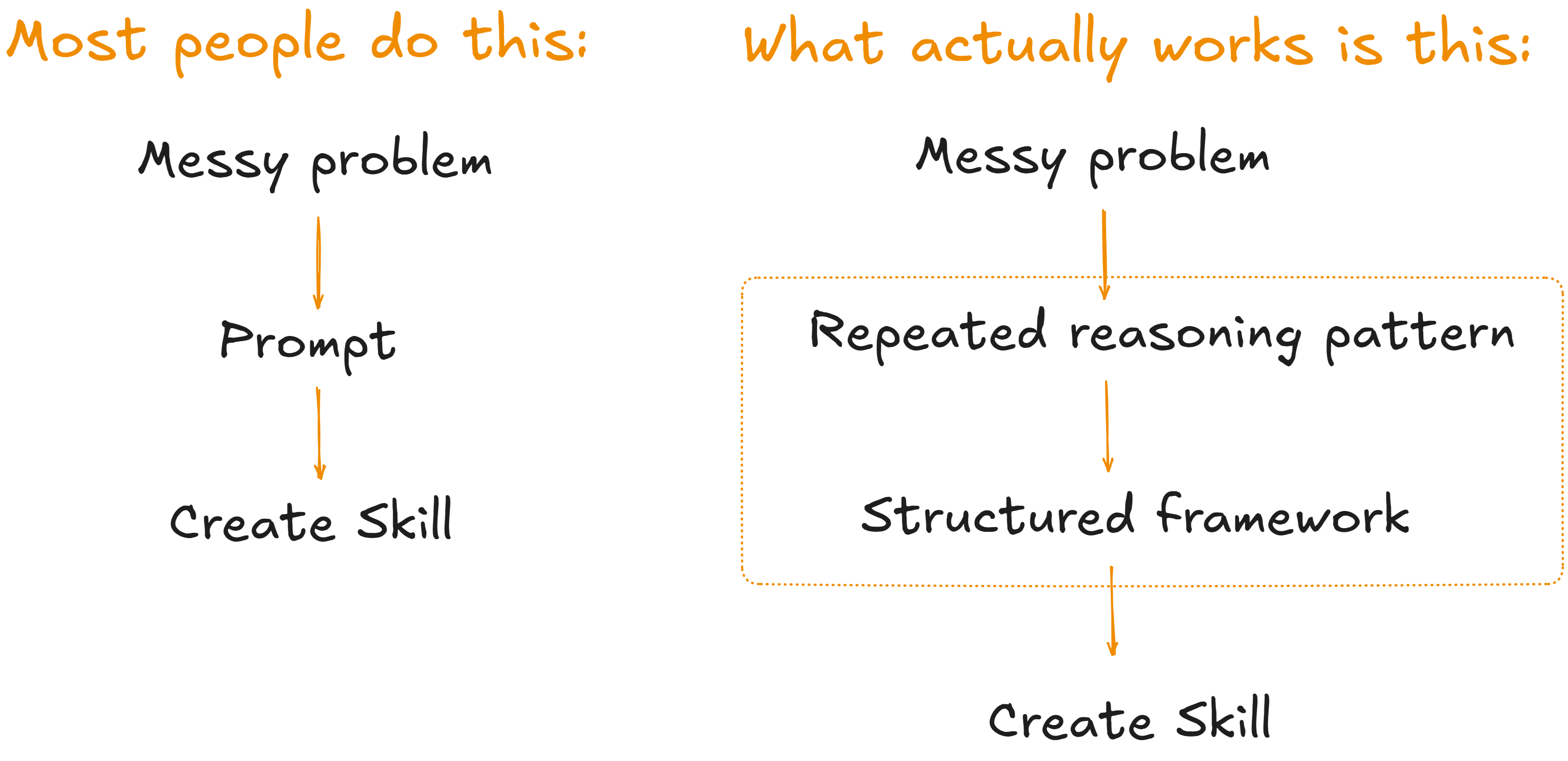
The difference is massive. In the first case (left side), you automate an idea. In the second case (right side), you automate a proven framework.
A Skill is not a clever idea. It is a structure that has already proven it works multiple times.
Claude Skills on the Web App (why it’s not enough)
This approach is based on a simple idea: instructions can be reused to carry out specialized tasks.
With Skills, you can:
-
Build custom workflows
-
Save hours on repetitive tasks such as reports and documentation
-
Generate content that follows your company’s brand guidelines, chart styles, font selections, visual design standards, and more
In a previous guide, we’ve seen how to easily create and use skills in the Claude web app. That’s the easiest way to work with skills. However, this comes with certain limitations:
-
Skills are downloaded as files
-
They start to multiply (especially in more complex projects)
-
Staying organized can become a headache due to the web’s limited environment
In short, creating a Skill on the web is easy.
Keeping it alive, consistent, and reusable is not.
Enter Claude Code Skills
This Claude Code feature offers a different way to integrate prompts into your project. Unlike the Skills created through the web interface, the difference is not in the responses themselves, but in where the rules are defined and maintained.
The core ideas behind Claude Code Skills are:
-
They operate with project-level rules
-
They have a clearly defined scope
-
They support versioning, which makes them scalable
-
They can be applied automatically
For many of us, working within the Claude Code Skills environment may seem challenging at first. However, that perception is far from reality. As you will see later, we can use Claude Code itself to help us build a Skill that generates other Skills.
2. How to work with skills in Claude Code
A Skill in Claude Code is simply a structured file inside your project.
Here is how you create one.
Create the folder structure: Project folder → Create skills folder → Create a subfolder with the Skill name → Create SKILL.md (or download it here)
my-skills/
├─ CLAUDE.md
└─ skills/
└─ weekly-decision-brief/
└─ SKILL.md
Now that the structure has proven stable, we can encapsulate it.
It is important to understand that what we will be creating is a file that defines the Skill. This file should be structured clearly and include well-defined boundaries so that its purpose and behavior are fully understood.
A practical and reliable Skill framework should include the following elements:
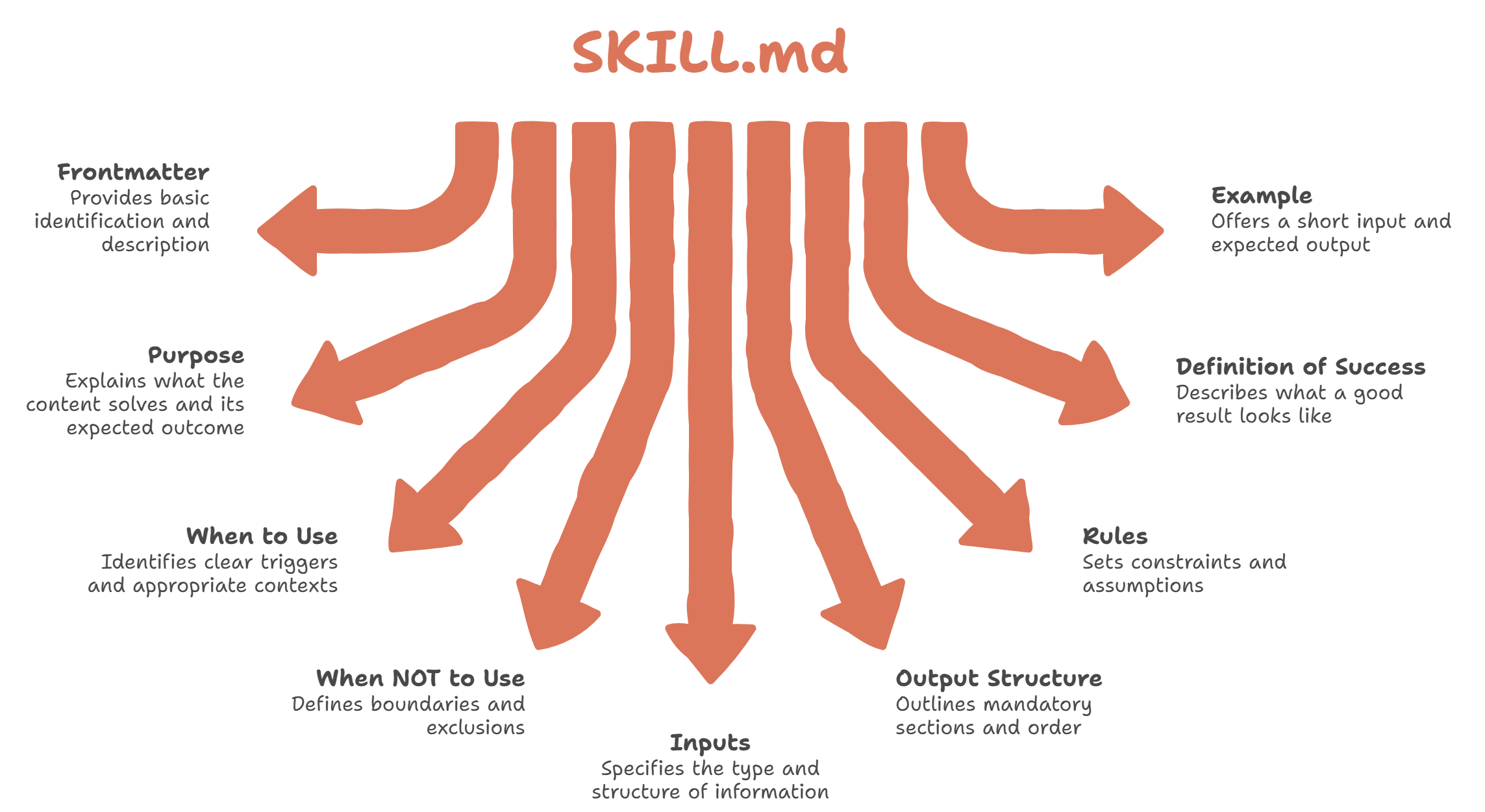
This ensures that the structure remains flexible enough to support both simple and complex Skills.
To follow the next steps, download the files CLAUDE.md and SKILL.md:
Let’s analyze the SKILL.md file:
🧭 Identity and Scope: Frontmatter, Purpose, When to Use, When NOT to Use
-
Clearly defined scope
-
Context-based activation, not improvisation
-
Explicit boundaries
🧠 Reasoning Discipline: Rules, Inputs
-
Separates facts from assumptions
-
Forces trade-offs to be made explicit
-
Handles incomplete information without fabricating
🏗 Repeatable Structure: Output Structure, Definition of Success
-
Fixed order
-
Mandatory sections
-
Evaluable outcome
This is not about automating a response. It is about automating a stable structure.
Perfect. Now let’s put it into action inside the Claude Code environment.
First, install Claude Code and VS Code, and then install the Claude extension. For details on the installation, check out this guide.
Then, select a working folder inside VS Code and paste the files you downloaded before. VS Code should look like this:
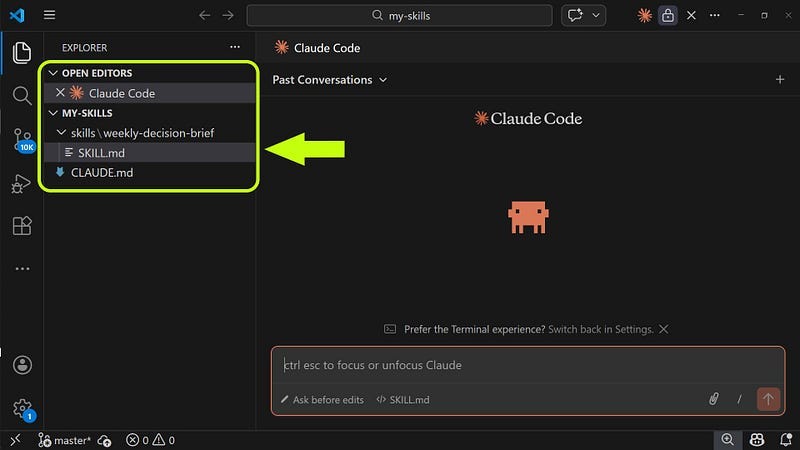
The folder structure would be organized as follows:
my-skills/
├─ CLAUDE.md
└─ skills/
└─ weekly-decision-brief/
└─ SKILL.md
This structure is intentional. It separates identity, defined in CLAUDE.md, from capabilities, contained in the skills/ directory. As a result, you can add new Skills without disrupting what is already working.
In this case, we are developing the weekly-decision-brief Skill, which is designed to turn scattered notes into a clear brief that supports better decision-making.
Now let’s test this Skill.
We will use the following prompt:
Turn these notes into a Weekly Decision Brief.
– Considering hiring a Head of Sales
– Revenue flat last 3 quarters
– Current team = 3 junior reps
– Cash runway = 8 months
– CEO feels we need “strong leadership”
– No clear sales process documented
– Investors asking about growth plan
Here are the results we got:
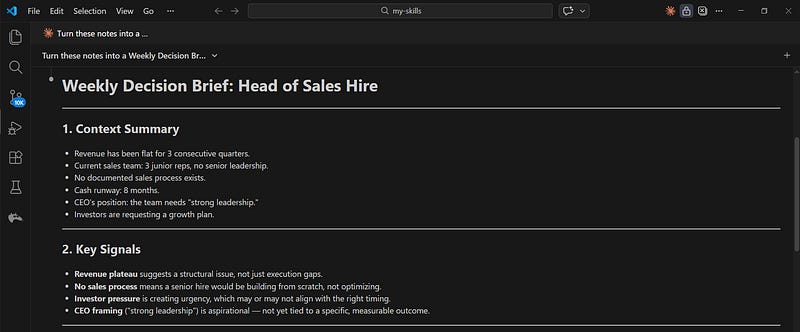
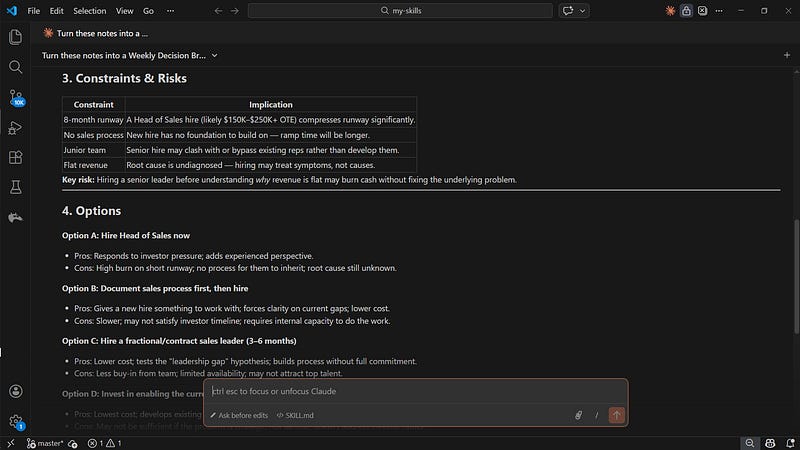
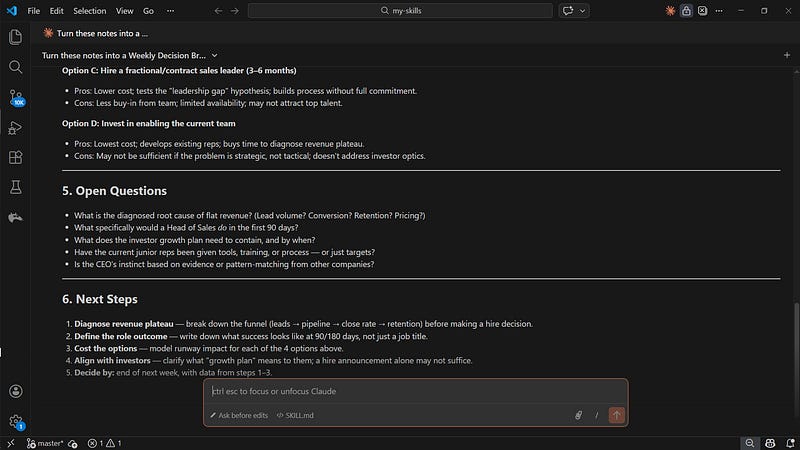
The result is not just a well-written answer.
It is a fixed structure:
-
Context Summary
-
Key Signals
-
Constraints & Risks
-
Options
-
Open Questions
-
Next Steps
The order does not change.
The sections do not disappear.
The reasoning pattern stays consistent.
That stability comes from the structure defined in SKILL.md.
What matters here is visible:
-
Sections are mandatory
-
Order is fixed
-
Trade-offs are explicit
-
Missing information is surfaced
-
Decisions are structured
This is not a better prompt.
It is enforced reasoning discipline.
While most AI tools begin each request from scratch, a Skill applies the same predefined structure consistently.
3. A Skill for Creating New Skills
This is not a Skill meant for daily use. It is activated only when we want to design a new skill, ensuring that it has a clear purpose, defined boundaries, and a solid structure before implementation.
Why does this matter?
Because it helps prevent:
-
Creating unnecessary Skills
-
Duplicating existing capabilities
-
Adding unnecessary complexity to the system
-
Turning every task into a Skill
In other words, not everything should become a Skill.
With a Skill creator in place, the structure would look like this:
my-skills
├── CLAUDE.md
└── skills
├── weekly-decision-brief
│ └── SKILL.md
└── skill-architect
└── SKILL.md
Now we will create a new Skill. For that, we will use the following prompt:
I want a skill that turns messy meeting notes into structured action plans with clear ownership and deadlines.
With this, we will have created a new Skill for our project:
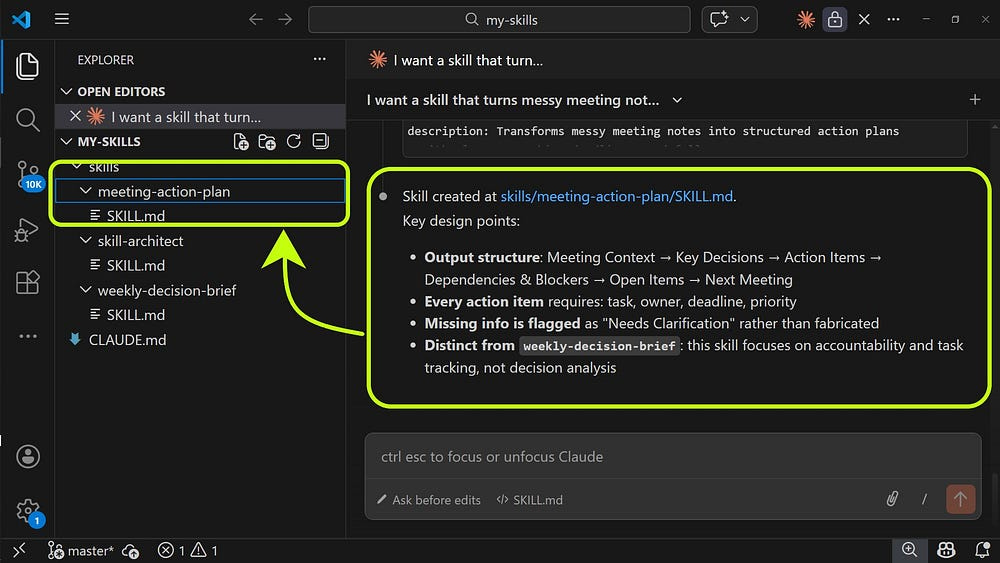
Now that we have added our new Skill, let’s test it. To do so, we will use the following prompt:
These are messy notes from today’s meeting:
– Marketing wants launch in March
– Dev says backend not ready
– Maybe split release?
– Someone mentioned budget constraints
– Ana will check numbers
– Need landing page
– Legal review pending
– Follow-up next week?
– Who owns the onboarding flow?
– Customer feedback unclear
Without explicitly telling it which Skill to use, we get the following results:
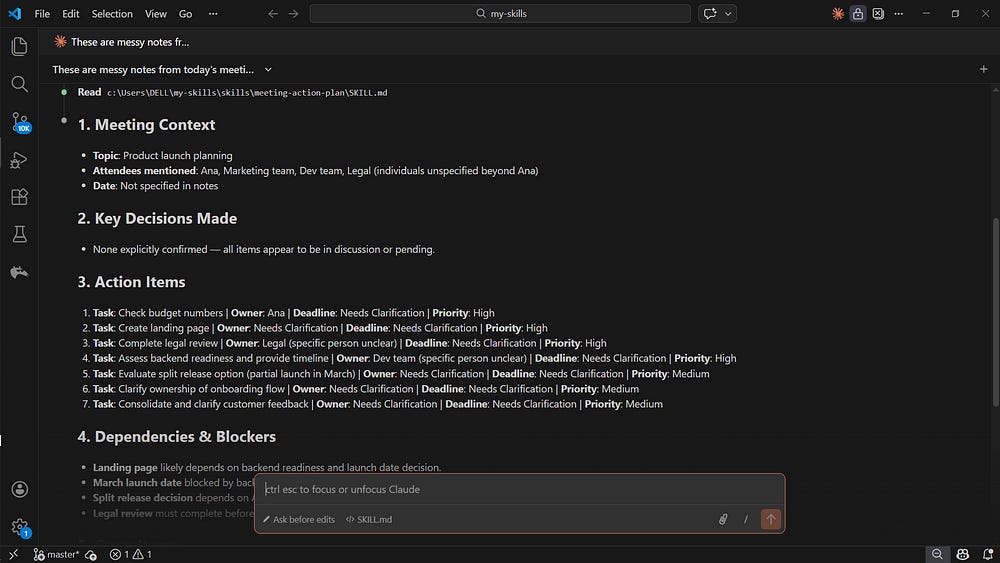
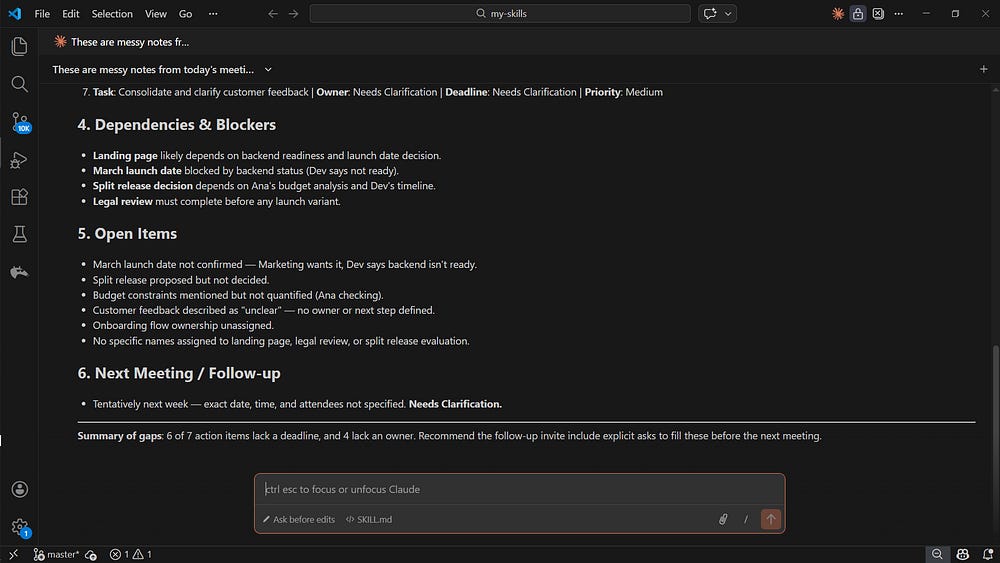
These results show that:
-
The purpose is clearly defined
-
The intent is explicit
-
The structure encourages additional, meaningful analysis
What we are really doing is designing behavior, and that fundamentally changes the way we work with AI.
We can also test whether our project is robust. To do that, we will use the following prompt:
We need to decide whether to delay launch or do a split release.
Backend not ready, marketing pushing March.
Budget unclear.
What should we do?
As expected, Claude Code was able to identify and apply the appropriate Skill:
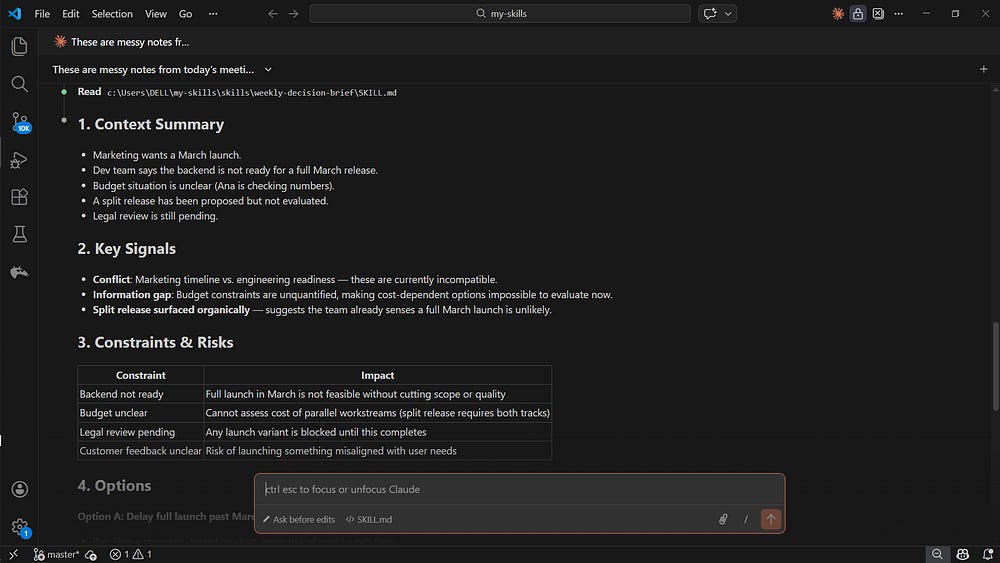
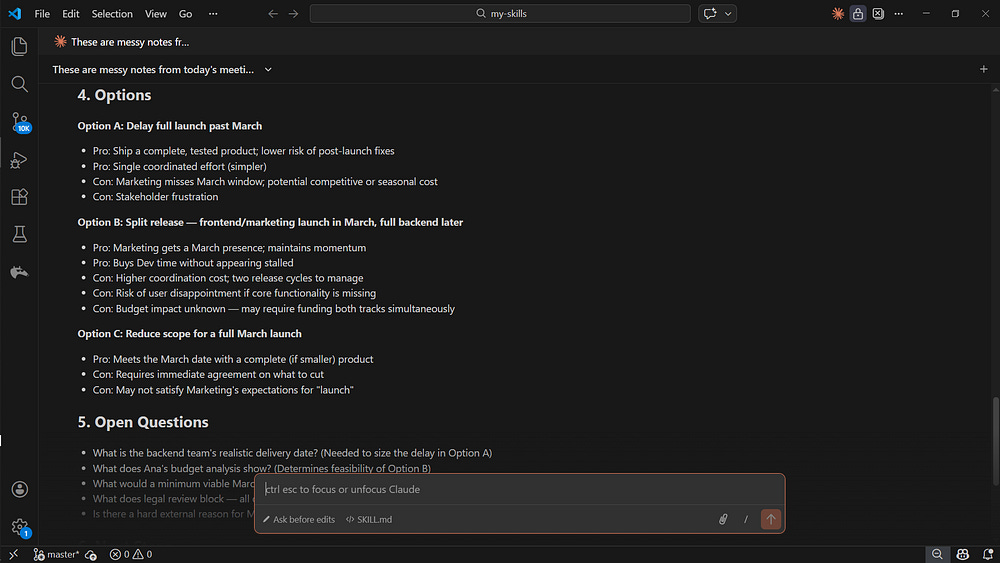
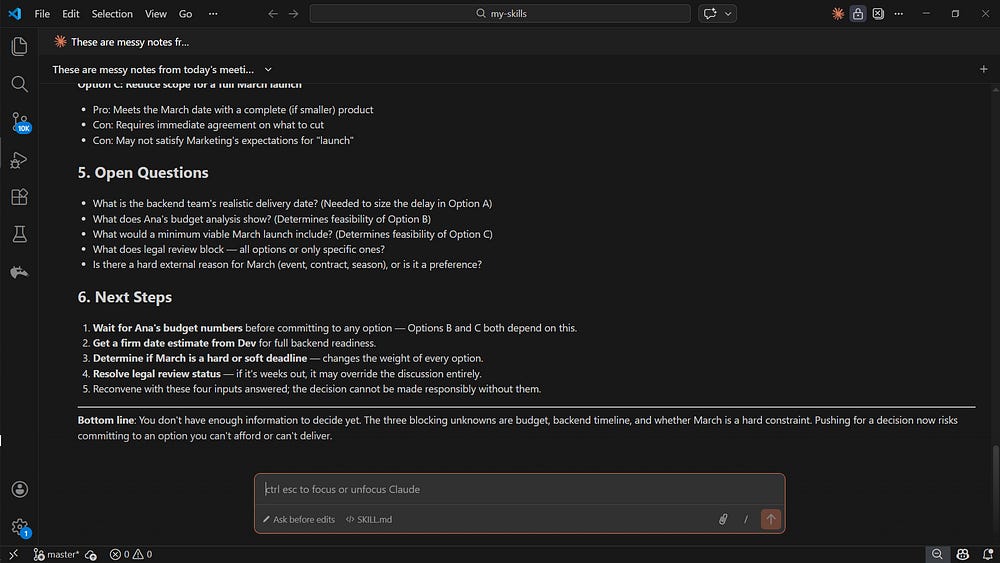
With this, we can conclude that our system demonstrates three things so far:
-
It can switch Skills based on intent
-
It can refuse to make a decision when there is not enough information
-
It can generate a consistent structure without being reminded
At that point, this is no longer just prompting. It is behavior design, and from an architectural perspective, it works.